Capture and markup
Rectangles, ellipses, arrows, text, pen, mosaic, and numbered notes in a toolbar that stays close without covering the work.
Windows 10 / 11Open sourceLocal OCR
No screenshot, paste, or window switching. Select text or draw around the screen, release the mouse, and read the translation where the original was.
v0.2.0 available
ON TOOLS & ATTENTION
Good tools make room for what matters.
Stay with the words.
Let the translation come to you.
让注意力,留在内容上。
让翻译,来到你眼前。
Essential workflow
Speed is more than one less button
snapTrans folds capture, OCR, translation, and presentation into one action. There is no confirmation dialog and no second input box to find.
Alt + Q by default. A reliable text selection is read directly; otherwise screen selection opens.
Local RapidOCR starts immediately and determines the translation direction.
The translation streams into the original region. Copy, reverse direction, or simply continue.
Beyond translation
Foreign-language sites, desktop software, long pages, and structured tables all begin with the same familiar selection.
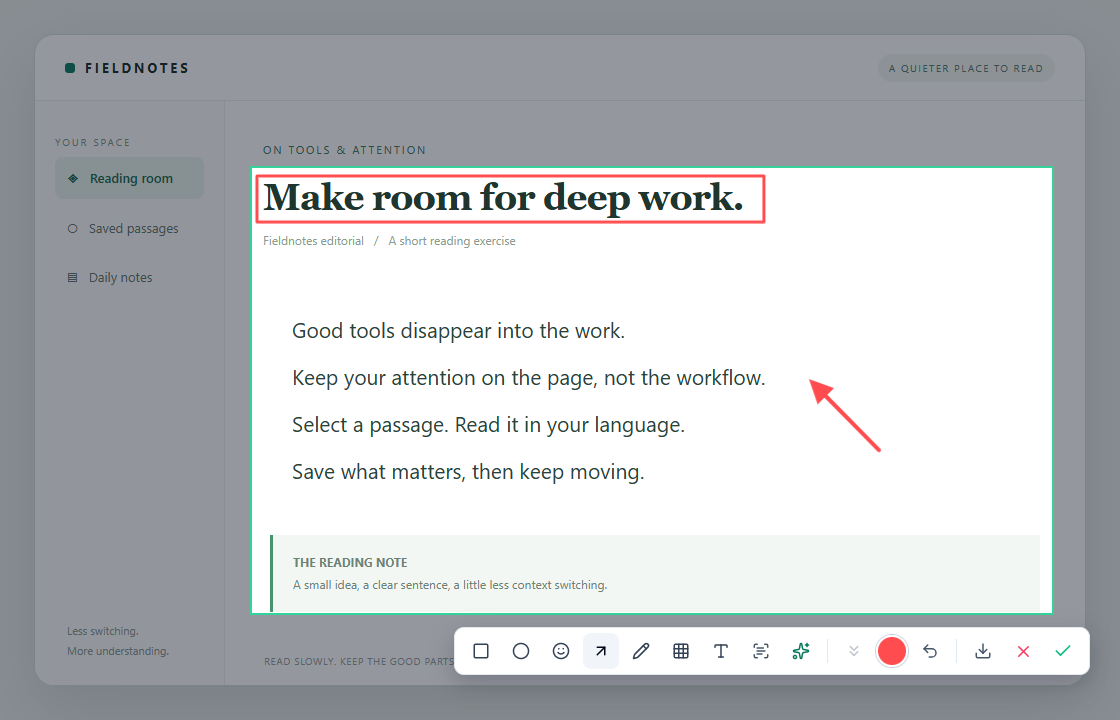
Rectangles, ellipses, arrows, text, pen, mosaic, and numbered notes in a toolbar that stays close without covering the work.
Control the scroll yourself, inspect the stitched image as it grows, and stop exactly where the page ends.
Recognize regular tables locally, review their cells, then copy clean TSV or Markdown.
Selection coordinates account for mixed display layouts and scaling ratios to reduce capture drift.
Data boundary
Privacy is an architecture choice
Capture and OCR happen on your computer. Recognized text goes to your chosen model provider only when you ask for a translation, explanation, or summary.
Read the full privacy policy →RapidOCR runs on-device. Screenshot pixels are not uploaded.
The API key is protected locally with Windows DPAPI.
Choose DeepSeek, self-hosted LiteLLM, or another compatible endpoint.
No product analytics; diagnostic logs stay local.
Open source & sponsorship
MIT licensed · Free forever
snapTrans itself is free and does not meter capture, OCR, translation, or markup. Online translation uses your own API key; any usage charges come only from the model provider you choose.
If snapTrans helps you, a small tip helps keep the project maintained.
One-time · Optional · No subscription
All features stay free for everyone.
Scan with the matching app, or save the image and scan it from your photo library. Enter your amount in the payment app and check the recipient before paying. Thank you!
Questions
Not for capture or local OCR. Online translation needs a key for DeepSeek, LiteLLM, or another OpenAI-compatible provider, which may charge separately.
No. RapidOCR recognizes the screenshot locally and snapTrans sends only the resulting text for translation.
The current target is Windows 10/11. A Mac version is planned, with native work required for capture permissions, shortcuts, and secure key storage.
Store certification is being prepared. For now, download v0.2.0 from GitHub Releases.